Postingan

Menampilkan postingan dengan label dinesh

[Solved] "Your device has been modified. Software updates are not available" error on non rooted Android device

Gambar
Yesterday when I was upda ting my new Galaxy S4 I faced a really weird issue. I started getting an error "Your device has been modified. Software updates are not available " whenever I tried updating the device. I know that I have this bad habit of tinkering with all the devices I get my hands on which made me wonder if I had rooted the wrong android device yesterday night during my random research :-o. I then checked my other device which was a Android S3 and noticed that it was rooted which kind of assured me that I did nothing that could cause this error on the S4. Googling this error showed me "N" number of pages mentioning that this error means I had goofed up the kernel and I can no longer update my phone and its warranty stands VOID.  (yea.. a serious WTF moment). Not that I care about  the stupid warranty, but I had resisted messing around with the device for 4 days already just to be sure that I had used it properly before it dies :D Then, after reading 100...

QuickStart iOS Security Assessment

Gambar
Introduction: So, I am gearing up to taking up yet another Mobile Application security training for a customer. This one is different than the one's than I normally take because its totally up to me to decide the duration of the course. Additionally it is planned to be a complete practical one with 80% demo and hands-on for the team. Since I had taken a break from the actual Mobile PenTest scene for some time now, I had to literally start from scratch so as to make sure I included anything that has come up in the last few months (which has been a lot :-o). During the prep-work, I created a short list of topics I would be covering for the course and turns out, this looks like a pretty neat iOS Security Assessment QuickStart guide. Hence the share. The Guide: This diagram covers all the focus points when testing an iOS application. Considering I am jam packed at the moment with multiple projects am not sure when I would be able to make a detailed post for each of the components, but ...

[Solved] sbt.ResolveException: download failed: org.slf4j#slf4j-api;1.6.6!slf4j-api.jar

Gambar
So, I was working on Scala with Play Framework for some time now. I have to compile the source code provided by the client from time to time and I have faced this issue nearly everytime whenever I use a new developer machine. When I run the "play clean", "play update", "play compile" or the "play run" command on the provided project, I get the error as  sbt.ResolveException: download failed: org.slf4j#slf4j-api;1.6.6!slf4j-api.jar . Below is a screenshot of this error message: I tried a bunch of ways to solve this issue, but only one method seems to work. The first thing you need to do is edit the /project/plugins.sbt file and add the latest version of  sbt-plugin in the  addSbtPlugin section. Now, delete the ivy directory present at  ~/.ivy2 Then, go ahead and delete the below mentioned files: <path to Play Framework home directory>/ .sbt.ivy.lock <path to Play Framework home directory>/cache/org.slf4j <path to Play Framework ho...

Installing latest nodejs on Linux

Gambar
Introduction: According to its site , Node.js uses an event-driven, non-blocking I/O model that makes it lightweight and efficient, perfect for data-intensive real-time applications that run across distributed devices. Basically, it is a server side software system that can be used to design and write scalable Internet applications. It can be used to create a web server on its own, thus removing the need of using a web server software like Apache. Due to the asynchronous I/O mode, there is minimum overhead(computation time). I have a machine running Ubuntu 12.10, so I normally use my package manager (apt-get) to install applications which are present in the repository. However, even though I did apt-get multiple times, the installed version seemed to an outdated v0.6.* where-as, the latest version as per their site was v0.10.4 (Huhhh!!!) Detailed Steps: Below are the steps which I had to perform, to get the latest nodejs up and running: ...

Mobile Client Side Certificate Pinning

I just completed giving a training on Secure Mobile application development and Code reviews  and one of the attendees asked me query whether we can limit a Mobile application to allow only the servers certificate to be a trusted one rather than relying on the Mobile's own Trusted Certificate Store? Well... there is a way actually. Its called as " Certificate Pinning ". Rather than relying on the device trusted store, set the application to trust only the servers SSL certificate. This way, when you are connecting to your specific SSL server, you don’t need anyone else to tell you the server’s identity. Compromises of any of the CA in the device trusted store too does not matter as the connection does not rely on it any more.  There are ways to implement it on both Android and iOS. Twitter for example; implements certificate pinning and i was not able to intercept traffic even after forcing my certificate on to the OS level trusted certificate list. Good Reads: Certificate...

[Solved] W: GPG error: http://coredev.nl iphone Release

Gambar
Many times when i was installing " Theos " on my iOS device everything went well till the last step which is "apt-get update". When i ran the command, it would always give me an error " W: GPG error: http://coredev.nl iphone Release: The following signatures couldn’t be verified because the public key is not available: NO_PUBKEY " as shown in the below screenshot. After much googling, i found this link which explains the solution to this issue. Though the scenario in the link is different than mine, however it seemed to work well for me :) The solution was, navigate to the sources.list.d folder and add the " public key " to that folder. This can be done wither by using "lynx" or by using "wget". A shown in the above screenshot, apt-get works well after the above steps were followed. References: http://imho.nu/iMHo/resize-root-partition/

iOS SSH over USB

Gambar
Introduction: Many a times, at client side we are not provided with Wifi access and connecting to our iOS device to read local data can be a real pain. At such a period, we can use a tool called as “usbmuxd” to connect to the Jailbroken iOS device running OpenSSH over the USB. Detailed Steps: Step 1: Make sure you have python installed on your machine. Download latest copy of “usbmuxd” using the command “git clone http://git.sukimashita.com/usbmuxd.git ”. Step 2: Navigate to the “python-client” folder and run the command “chmod +x tcprelay.py” and then run the tool using the command “./tcprelay.py -t 22:2222” The “t” basically allows multiple threads to run so that multiple simultaneous ssh connections can be established. Step 3: Now, once the tcprelay starts its work, we use the command “ssh root@localhost -p 2222” to forward the local port 2222 to remote port 22. Use the credentials “root/alpine” to connect to the OpenSSH server running on the device. Now, all the commands which can ...

Adding custom certificate to Android Trusted certificate store

Gambar
Introduction Android maintains a list of trusted certificates any deviance in the certificate would result in a error in connection. Below screenshot shows how the browser gives a popup when we set the Android device to forward the traffic to Burp Proxy instead of the actual server. Once, the user clicks on “Continue”, the user can continue to use the application as per his requirement. However, in case of native applications there is no “popup” and the connection is directly rejected. Solution: Add the proxy certificate to android trusted store. How: Step 1: Download the latest copy of bouncycastle lib from http://www.bouncycastle.org/latest_releases.html into a folder called “lib”. During the making of this document, the latest version of the lib was v1.47. Step 2: Extract a copy of the current certificate file ie. “cacerts.bks” from the android device using: adb pull /system/etc/security/cacerts.bks Step 3: Download a copy of the Charles Proxy certificate from the Charles website ht...

Decompiling Encrypted iOS binaries

Gambar
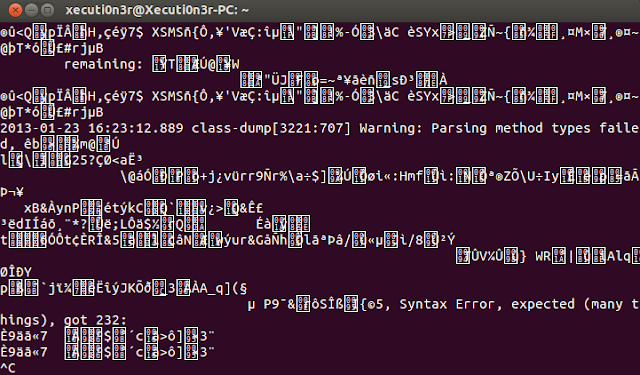
Introduction: In my previous article , i had described how you would normally go about decompiling an iOS application. That method would be working for a majority of applications. However, many a times the developers push in security feature to prevent the attackers from decompiling/debugging the application. In our case, though we are the developers friends and are testing the application, it would be good if we actually follow the same route as an attacker would. That way, we can understand what exact information is disclosed and how the application can be compromised. Requirements: iOS device must be jailbroken. OpenSSH should be installed on the iOS device. SSH Client on your machine. "Class Dump" should be installed on the iOS device via "Cydia" "Cycript" should be installed on the iOS device via "Cydia". Detailed Steps: First we will try and use the same step as used in our previous post to dump the class file information via "class du...

Reverse Engineering an Android application

Gambar
Introduction: The Android compiler suite compiles the developer's Java files into class files, and then the class files are converted into dex files. Dex files are bytecode for the DalvikVM which is a non-standard JVM that runs on Android applications. The XML files are converted into a binary format that is optimized to create small files. The dex files, binary XML files, and other resources, which are required to run an application, are packaged into an Android package file. These files have the .apk extension, but they are just ZIP files. Once the APK package is generated, it is signed with a developer's key and uploaded onto the  Androidmarket via Google's website from where the user can download these APK files and install them on the Android device. Requirements: Tool to unpack the .apk file : 7zip Tool to convert the .dex to a .jar file : dex2jar GUI tool for Java decompilation : JD-GUI The android apk file. Detailed Steps: Step 1: You can get the apk file matc...